

Eddie
United Kingdom
Oct 17, 2025
5 out of 5 stars
I USE THIS ALL OF THE TIME I JUST LOVE IT.
Recovery Toolbox for Outlook helps to convert OST file to PST file
Recovery Toolbox for Outlook is an OST to PST Converter Tool for Windows that helps users convert, recover, preview, and migrate mailbox data from inaccessible, orphaned, encrypted, or damaged OST files. The software converts OST to PST while preserving emails, attachments, contacts, calendars, tasks, notes, metadata, and the original folder structure. It supports OST files created by multiple Microsoft Outlook and Exchange Server versions, including large files. Users can inspect converted content for free before purchasing the full version. This practical OST to PST conversion software for Outlook helps users when the account, profile, domain controller, or Exchange Server is unavailable.
A step-by-step manual for the conversion of Exchange Server OST files to Microsoft Outlook PST files. This instruction helps to convert OST to PST files with all messages, contacts, appointments, tasks, notes, journals, calendars and so on:
Tested & Verified on Microsoft Outlook 2024, 2021, 2019, 2016 and Office 365 OST files with size up to 150Gb. Reviewed by MS MVP Victor Bobrov.

OST-to-PST conversion is an added feature of Recovery Toolbox for Outlook. The OST to PST Converter can convert .ost files from any version of Microsoft Outlook or any version of Microsoft Exchange Server into the .pst file format without Exchange Server or Windows Domain Controller. Customer can convert ost to pst online on any device in Windows, Android, macOS, iOS and so on.
Features of OST-to-PST conversion software:
Recovery Toolbox for Outlook helps to import OST files in Microsoft Outlook in a few easy steps:
Recovery Toolbox for Outlook is OST-to-PST converter and an Outlook OST recovery tool at once.

Recovery Toolbox for Outlook converts and recovers data completely offline. The program does not require an internet connection. No data is shared with third parties or other companies.
Below are all the situations in which Microsoft Outlook users really need to convert OST files to PST files to preserve their data, email correspondence, contacts, appointments, and more.
1. The email account was deleted
For example:
After an account is deleted, the old OST file usually becomes orphaned: Outlook creates a new OST file for the re-added account and does not automatically reconnect the old one.
2. Access to the mailbox has been permanently lost
Possible causes include:
If server access cannot be restored and the data remains only in a local OST file, it must be exported to a PST file.
3. The Exchange Server has failed or been taken offline
Conversion may be necessary if:
In such situations, the OST file on users' computers is sometimes the last available copy of their correspondence.
4. The old OST file won't connect after creating a new Outlook profile
This can happen after:
Even if the email address has remained the same, the old OST file may be associated with a different profile or the mailbox's previous server identity.
The mailbox was migrated to a different Microsoft 365 tenant or Exchange organisation
This includes:
If some data was not transferred and the previous server is no longer accessible, the old OST file must be converted to a PST file and imported into the new mailbox.
6. The user has received a new computer, but the old mailbox is no longer accessible
Simply copying the OST file to a new computer does not equate to transferring email. If the old profile and server account no longer work, the transferred PST file serves as a way to access the saved data in a different Outlook profile.
If the account is still accessible, conversion isn't necessary: usually, it's enough to add it on the new computer and wait for synchronisation.
7. You need to restore data from a backup of the old computer
For example, an OST file was found:
Since this file is no longer associated with an active profile, it is usually extracted or recovered first, and then converted to a PST file.
8. The OST file was deleted but recovered using file recovery software
After recovery from an HDD, SSD, or flash drive, the file may:
In this case, you need not a standard export, but a recovery of the OST file's contents, saving the found items to a new PST file.
9. The OST file is corrupted, and the server copy is incomplete or unavailable
Corruption may occur after:
Symptoms:
If the server contains all the data, Microsoft recommends rebuilding the OST file. However, if the OST file contains local items that are not present on the server, you should first export or restore them to a PST file.
There are cases where local data may exist only in the OST file, and to use it, you must convert the data to a PST file.
10. Outlook was running offline, and changes did not have time to synchronise
The following may remain in the OST file:
This is especially important if the computer has been in Work Offline mode for a long time or displayed a Disconnected status.
11. There were persistent synchronisation errors
The local and server copies of the data may differ. For example:
Before recreating the OST file, Microsoft specifically recommends exporting local data to a PST file if it is not present on the server.
12. The OST file contains This computer only folders
This is particularly common for IMAP accounts. Such folders may contain:
IMAP primarily synchronizes email folders, so Outlook calendars and contacts may be stored only on the computer. Deleting an account or recreating an OST file can destroy the only copy of this data. Microsoft, for example, provides a separate option to export the Contacts folder (This computer only).
13. The data was stored in the cache of a shared or delegated mailbox
Conversion may be necessary after:
If items from the public mailbox have been downloaded to the local cache and are no longer accessible anywhere else, you can try to save them to a PST file. It is important to have valid authorisation from the owner or organisation.
14. The server policy deleted the data, but the disconnected computer has not yet synced
A less obvious scenario:
Before connecting the old Outlook to the server, it's a good idea to create a copy of the OST file and save the necessary items to a PST file.

15. You need to transfer emails to another account
For example:
Microsoft explicitly lists transferring between accounts as one of the reasons for creating a PST file.
16. Transferring Outlook from one computer to another
A PST file may be needed if a user wants to transfer not only server-based email, but also:
If you have an active Exchange mailbox, regular synchronisation is preferable. A PST file is primarily needed for local or archived data.
17. Transferring Data from Outlook for Windows to Outlook for Mac
Outlook for Mac can import a PST file created by Outlook for Windows. Therefore, you must first export the OST file using the standard method or convert it to a PST file.
18. Importing Data into Exchange Server or Microsoft 365
Some administrative import tools accept PST files but not OST files. A PST file can be used to:
Exchange Server has built-in procedures for importing PST files via the Mailbox Replication Service.
19. The migration program or third-party system accepts only PST files
PST files are often used as an intermediate format for transferring data:
If the source is only available as an OST file, it must be converted.
20. You need to merge several old mailboxes
For example, you need to:
A PST file is convenient as an intermediate, portable container.

21. You need to save an offline archive before closing the mailbox
Common scenarios for creating an offline archive in a PST file from a working OST file:
22. You need a backup independent of the mail server
An OST file is not considered a complete backup because it synchronises server changes and may replicate server deletions. A PST file is a separate snapshot of the data at the time of export.
Microsoft recommends exporting to a PST file to create a local backup of your email.
23. You need to capture the mailbox's state before making risky changes
You need to capture the state of the OST file by exporting the data to a PST file. For example, before:
24. The mailbox is full
You can move old emails from the OST file to a PST file to:
Microsoft explicitly recommends using a PST file to archive old items and free up space in your mailbox.
25. A permanent archive that can be accessed without a server is required
A PST file allows you to read, search, forward, and process saved emails without connecting to the original Exchange Server or using the original account.

26. Electronic discovery (eDiscovery)
A copy of a PST file may be required for:
27. Audit, tax audit, or verification of business correspondence
A PST file can be used as a working copy of an OST file for analysing:
For legally valid use, you must retain the original OST file, checksums, the activity log, and the chain of custody. A simple conversion alone does not prove the integrity of the data.
28. Transferring Cases to a New Employee or Designated Person
Following resignation, leave, or a change in position, it may be necessary to transfer:
A PST file allows you to transfer selected data without granting access to the old account.

An OST file may not contain the entire mailbox.
In Cached Exchange Mode, Outlook often downloads only messages from a specific time period. For example, if set to 3 months, older messages remain only on the server. Converting an OST file to a PST file will not restore them.
Before performing a standard export, Microsoft recommends setting the Mail to keep offline option to All and waiting for full synchronisation.
A PST file does not preserve absolutely all Outlook settings.
During a standard export to PST, emails and attachments, folders, contacts, the calendar, and tasks are usually preserved. However, Microsoft notes that the following are not exported:
Also, a PST file is not a backup of:
Microsoft explicitly recommends using a PST file to archive old items and free up space in your mailbox.
Requirements:
Notes:This product does not export contact groups
The extensions of recovered files: pst and ost. The Online Service and Recovery Toolbox for Outlook repairs files Microsoft Outlook 98 / 2000 / 2002 / 2003 / 2007 / 2010 / 2013 / 2016 / 2019 / 2021 / 2024 and Outlook for Microsoft 365.

Question:
On a Windows 10 PC, I still have Outlook 2019 and a local OST file from an old corporate account. The Outlook account was accidentally removed first; later, the admin deleted the mailbox and user from Active Directory. The Microsoft 365 license and subscription have expired, the old domain is offline, the password cannot be reset, and the previous MFA method is gone. The company and its email provider have shut down, so the former admin is unreachable. Outlook creates a fresh profile but refuses to mount the old OST. It still contains messages, contacts, calendar items, tasks, and notes. Which OST to PST converter tool should I use? Can you explain how to convert OST to PST file data, and will OST to PST conversion software for Outlook work when the source server is gone?
Answer:
Conversion is necessary because an OST file is a cache tied to a specific Outlook profile and mailbox. Copying the file, changing its extension, or adding it on the Data Files tab does not turn an orphaned OST into a portable archive. The same roadblock appears after the entire Outlook profile is deleted, a corporate account is locked, a mailbox is removed after an employee leaves, a Microsoft 365 license is lost, an email domain expires, the company or provider shuts down, the password or MFA method is lost, or the admin is no longer reachable.
Best first move: If you can still restore Microsoft 365 or Exchange access, ask the admin to reinstate the account, license, and mailbox permissions temporarily. After a full sync, open classic Outlook and export the required folders through File > Open & Export > Import/Export > Export to a file > Outlook Data File (.pst). This is the cleanest route because Outlook reads the data through the live mail profile.
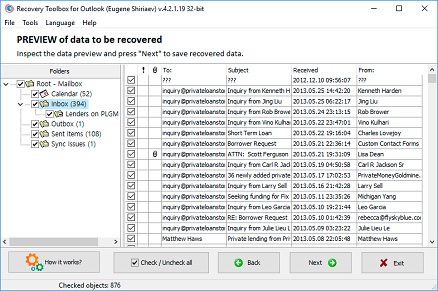
If the server-side mailbox no longer exists, use an OST-to-PST converter tool to convert a working copy of the local OST offline. Recovery Toolbox for Outlook functions as ost to pst conversion software for Outlook: select the OST file on the first screen, choose conversion to a PST file, wait for the scan, review the folders and items found, select the messages, contacts, appointments, tasks, and notes you need, choose a destination folder and PST as the output format, and start saving. This workflow shows how to convert OST to PST file content even when the old profile and server are unavailable. Add the resulting PST to classic Outlook through File > Account Settings > Account Settings > Data Files > Add, then spot-check several folders and attachments.
Question:
Our organisation runs Outlook 2016 on Windows 10 PCs with an on-premises Exchange Server. A disk-array failure physically damaged the server; the Exchange database and EDB file will not open, no usable backups exist, and part of the Active Directory infrastructure is gone. Exchange has already been reinstalled once. The old server was also being decommissioned after a move to another mail system before every mailbox was exported. OST files remain on the workstations and may be the last copy of the email. I need a safe playbook for how to migrate OST to PST with an OST converter tool, a reliable OST to PST converter, and a way to convert OST PST data without a working Exchange Server.
Answer:
In this situation, a PST file is an independent container for data that survives only in users' local caches. An OST may contain messages and other items that synced before the crash, but it is not a replacement for the Exchange Server database and cannot be mounted in an arbitrary new profile. A convert OST PST recovery job therefore makes sense after physical server damage, loss of the EDB file, missing backups, an Exchange reinstall, loss of Active Directory, shutdown of the old Exchange organisation, or premature server teardown.
Best first move: try to restore Active Directory, Exchange Server, and the database from a verified backup, or mount the recovered EDB file with supported Exchange tools. If the mailbox comes back online, sync Outlook and use the normal PST export. Do not open the original OST in Outlook without copying it first; a new sync or profile rebuild can modify the local cache.
If the server cannot be recovered, make a read-only working copy of every OST and convert only the copies. Recovery Toolbox for Outlook can also convert OST to PST: select the file, choose conversion mode, review the folder tree and item counts on the preview screen, select the required data, set the output folder, and save to a PST file. This is the practical workflow for migrating OST to PST with an OST converter tool when bringing the old Exchange Server back online isn't an option. Open each PST in a test Microsoft Outlook profile and spot-check dates, senders, attachments, calendar entries, and contacts. If multiple OST files contain pieces of the same mailbox, convert them separately so the data lineage stays clear.
Question:
After reinstalling Windows 11 and Microsoft Office 2021, I created a new profile through the Mail control panel. The old OST was preserved, but Outlook 2021 will not accept it. I have seen the same issue after restoring a Windows user profile, replacing a corrupted Outlook profile, moving a PC to another domain, switching local Windows accounts, or launching Outlook as another Windows user. The mail server is no longer available, so a fresh sync is impossible. Can you show me how to convert an OST to a PST file, which OST-to-PST conversion tool fits this job, and whether I need dedicated OST-to-PST converter software to recover the messages, contacts, and calendar?
Answer:
An old OST is tied not only to an email address but also to a specific profile and internal mailbox IDs. After Outlook, Office, or Windows is reinstalled; a new Mail profile is created; the domain or Windows user changes; or a profile is restored or replaced, simply pointing Outlook to the old file usually doesn't rebuild that link. Dedicated OST-to-PST converter software is useful when the server can no longer generate a fresh local cache.
Best first move: if the email account still works, add it to the new profile, wait for a complete sync, and export the available folders to a PST with classic Outlook. If you have a full image of the old system, you can boot it in an isolated environment on another PC or in a virtual machine and check whether the original profile opens, while leaving the source drive untouched.
When both the server and old profile are unavailable, a practical way to convert an OST file to a PST file is to scan a copy of the OST with a specialised utility. Recovery Toolbox for Outlook works as an OST to PST conversion tool: select the saved OST, choose conversion mode, preview the recovered content, select the required folders and items, choose a new folder for the PST, set PST as the output format, and start saving. Then add the PST in Outlook 2021 under the Data Files tab. Do not replace the source OST or merely rename its extension; that does not rebuild the internal structure and can make another recovery attempt harder.
Question:
I am moving a user who runs Outlook for Microsoft 365 on Windows 11. The mailbox is moving to another Microsoft 365 tenant, while part of the department moved between two Exchange Server organisations. The company is also changing its mail domain and org structure; some mailboxes are going from on-premises Exchange to Microsoft 365, while others are moving back on-premises. After a merger and split, several employees received brand-new mailboxes instead of a proper migration. Part of their old mail is missing from the new profile but is still visible in a saved OST. I need an Outlook OST-to-PST conversion workflow, an offline OST-to-PST converter, and an OST-to-PST file converter so I can import the data into the new mailboxes without regaining access to the former organisation. What is the safest way to do it?
Answer:
During a cross-tenant migration, a move between Exchange organisations, a transition from on-premises Exchange to Microsoft 365 or back, a domain change, or a company merger or split, the old OST often remains bound to the original mailbox. A newly created mailbox does not inherit that local cache. An Outlook OST-to-PST conversion workflow creates a portable staging file that you can check before import.
Best first move: while the source tenant or Exchange Server is still available, use the admin-supported server migration tools, review the migration reports, and export any missing folders from a working Outlook profile. This route preserves more server-side properties and reduces the chance of duplicates.
If the source organisation is already offline, run an offline OST to PST converter against a copy of the local file. Recovery Toolbox for Outlook can act as an OST to PST file converter: select the old OST, enable conversion, inspect the folder tree, exclude unneeded shared mailbox cache, select the user data you need, choose an output folder, and save a PST. Attach the PST to a test profile first and verify dates, folders, contacts, appointments, and attachments. Then import only the missing data into the new mailbox, preferably in small batches while watching for duplicates and mailbox quota limits.
Question:
I received a new Windows 11 PC with Outlook for Microsoft 365, but the old mailbox has already been closed. I found the old OST in an image of the Windows 10 system drive. Coworkers have found similar files in Windows Backup, a volume shadow copy, a removed drive, an enterprise backup system, an FSLogix profile container, a virtual machine, and a recovered deleted partition. The normal export OST to PST route in Outlook 365 is unavailable because the source account will not connect. Which convert OST to PST tool or migrate OST to PST software can extract the local folders, contacts, and calendar?
Answer:
An OST from an old backup may be the only available snapshot of the mailbox, especially after you configure the new PC and delete the old mailbox. Outlook 365's built-in OST to PST export workflow works only when Outlook can open the source profile and see its data. If you recover an OST from a disk image, Windows Backup, a shadow copy, a removed drive, an enterprise backup, FSLogix, a VM, or a restored partition, extract it to a regular local folder first. Keep the original untouched.
Best first move: if you can boot the old system image safely and the original account still authenticates, open classic Outlook, let it finish syncing, and export the data to a PST. Before booting, make a control copy of the OST because Outlook may update the cache.
If the profile will not start, Recovery Toolbox for Outlook can be used as a tool to convert OST to PST. Copy the OST out of the backup container, verify that the extraction completed and the file is not zero bytes, select it in the program, choose conversion mode, preview the folders and items, select what you need, and save the result as a new PST. This Migrate OST to PST software workflow processes the file separately from the old Windows installation. You can then add the PST to Outlook for Microsoft 365 on the Data Files tab. Keep results from different backups in separate PST files and compare their dates so older and newer snapshots do not get mixed.
Question:
A local OST used by Outlook 2024 on Windows 11 became corrupted after Outlook crashed and the power went out. Before that, Windows had been freezing, the disk was almost full, antivirus software scanned the OST while Outlook was running, and an Office update failed. The file system and SSD also reported errors; sync sessions kept dropping, the profile was damaged, and the OST grew uncomfortably large. The server copy is incomplete. I deleted a different OST and then restored it with file-recovery software. I need an OST file converter to convert an Outlook OST file to PST for recovery purposes. Can you explain how to convert .ost to .pst file content when the source OST is partially damaged?
Answer:
First, separate conversion from recovery. A healthy OST only needs conversion to a portable PST. An OST that was undeleted with file-recovery software or damaged by a disk, file system, power, Windows freeze, low-space, antivirus, Office update, sync, profile, or excessive-size problem needs its surviving internal structures recovered before saving. A basic OST File Converter may therefore miss some items, and you must never overwrite the source file.
Best first move: if the server is available, rename a copy of the problem OST, create a new profile, and let Outlook resync the mailbox. For disk errors, first create a sector-by-sector image with an appropriate disk utility and work from a copy of the OST. The built-in Inbox Repair Tool (SCANPST.EXE or SCANOST.EXE) is designed for Outlook data files and may modify them, so never run it against your only copy.
Recovery Toolbox for Outlook can perform an Outlook OST file to PST recovery after analysing the readable structures: select a copy of the OST, run the scan and conversion, review the folders and objects actually found, select the recoverable data, choose a separate output folder, and save a new PST. This is a practical method for converting .ost to .pst when the server copy is incomplete. Open the PST in a test profile and check problem folders, attachments, and calendar entries. If an undeleted OST was physically fragmented, some items may be gone; full recovery cannot be promised before previewing the results.
Question:
A user spent several weeks working in Work Offline mode in Outlook 2019 on a Windows 10 laptop, and Outlook frequently showed Disconnected plus sync errors. The IMAP profile contains calendar and contact folders labelled This computer only that never synced to the server. A server retention policy has since deleted old messages, but the laptop has not reconnected yet. I need to capture the local state before the next sync. Will an OST recovery tool help? Do I need OST to PST file conversion software, and is converting OST to PST file data safe right now?
Answer:
Yes. First, make a copy of the OST while Outlook is completely closed and before the PC goes online. Extended use of Work Offline, a Disconnected status, and recurring sync errors mean the local and server copies may differ. This computer only folders in an IMAP profile are especially fragile: rebuilding the profile or OST can wipe out their only copy. If the server already enforced a deletion policy, the next sync may repeat that deletion locally. In this situation, converting OST to PST file data creates an independent snapshot of what is still readable.
Best first move: if Outlook still opens the old profile, keep the PC offline and export the local folders to a PST with the Import/Export wizard. Verify the PST before allowing any sync. Make a separate copy of the OST before doing anything else.
If Microsoft Outlook cannot open the profile or its export misses the required folders, use Recovery Toolbox for Outlook as an OST recovery tool. Open a copy of the OST on another drive, choose conversion mode, verify the data in preview, and specifically select unsynced folders, This computer only items, contacts, calendar entries, tasks, and notes. The ost to pst file conversion software then saves the selected items and folder structure to a new PST. Attach it to a test profile, confirm the local items are present, and only then bring the original Outlook profile back online.
Question:
A Windows 11 workstation running Outlook for Microsoft 365 still has an OST that cached a departmental shared and delegated mailbox. Access to the shared mailbox has been revoked, delegation has ended, the shared mailbox itself was deleted, the former employee's account was closed, the project mailbox was retired, and public folders on the old Exchange Server are unavailable. None of that data appears in the new profile, although messages and attachments may remain in the local OST. How can I convert Outlook OST to PST file data? Can you explain how to convert an OST to PST file correctly, and which Outlook OST to PST Converter I should use to separate shared mailbox data from personal mail?
Answer:
A shared or delegated mailbox cache doesn't necessarily belong to the user's primary mailbox. It may disappear after access is revoked, the shared or project mailbox is deleted, delegation ends, the former employee's account is closed, or old Exchange public folders are lost. The answer to how to change OST to PST file format is not to rename the extension. First, identify which folders actually survived and which mailbox each one belongs to.
Best first move: ask the admin to restore the shared mailbox or delegation rights temporarily, then open it in classic Microsoft Outlook and export only the approved data to a PST. Check company policy, authorisation, and retention requirements before exporting; having a local cache does not automatically authorise copying someone else's messages.
If server access cannot be restored, Recovery Toolbox for Outlook can be used as an Outlook OST to PST converter. Work only with a copy: select the OST on the utility's first screen, enable conversion, locate the shared or delegated mailbox folders in preview, select only authorised items, choose a separate output folder, and save a new PST. This lets you convert Outlook OST to a PST file without mixing the shared archive into personal mail. Name the output PST for the mailbox and snapshot date, then open it in Outlook and verify the folder structure, messages, and attachments.
Question:
I have an old OST from Outlook 2021 on Windows 10, but classic Outlook is not installed on the new PC yet. I need to move authorised data from a personal account to a corporate account, copy some approved corporate mail to a personal archive, and collect messages from Yahoo, Gmail, and another IMAP server for import into Microsoft 365. In other cases, I move data from an old Microsoft 365 account to a new one, between two addresses owned by the same user, or into a shared archive mailbox. Can you explain how to convert OST to PST without Outlook, whether a Microsoft OST to PST converter tool can do it, and how a Microsoft OST to PST conversion tool differs from a regular server-side export?
Answer:
A PST is a handy portable staging container when the destination account differs from the one that created the OST. You can move personal or corporate mail only if you have the right to the data and follow your employer's policy. The workflow for how to convert OST to PST without Outlook is especially useful when the old profile will not launch, or classic Outlook is not installed on the new PC.
Best first move: if the source Yahoo, Gmail, IMAP, Exchange, or Microsoft 365 accounts are available, connect them to a supported mail client or use their built-in export and migration options. In classic Outlook, you can sync the source and export selected folders to a PST; a Microsoft 365 admin can use the organisation's approved migration tools. Do not assume Microsoft provides an official converter for every orphaned OST: its built-in export depends on an accessible profile and mailbox.
When only a local OST is available, Recovery Toolbox for Outlook works as a Microsoft OST to PST converter tool. It analyses the OST without launching the source profile, displays the folders it finds, and saves selected data to a PST. Use this Microsoft OST to PST conversion tool in the following order: select the OST, choose conversion, preview the content, select authorised data, choose an output folder and PST format, and start saving. After installing Outlook, add the new PST through Data Files, then move data into the destination account in controlled batches to avoid duplicates and quota overruns.
Question:
I am moving Outlook 2019 from a Windows 10 PC to a new Windows 11 machine running Outlook for Microsoft 365. I need not only server-side mail but also local folders, calendar entries, contacts, tasks, notes, archives, and items that never made it to the server. Some of the data will later be opened in Outlook for Mac; an admin will import another PST into Exchange Server and Microsoft 365; and a third-party migration platform accepts only PST files. Please explain how to convert OST into PST, how to convert OST to PST in Outlook 365, and how to convert OST files to PST when there are several source files.
Answer:
During a normal PC replacement, server mail syncs again, but local folders, unsynced items, notes, tasks, and some archive data may never appear on the new device. A PST is a verifiable staging container for moving data to another Windows PC, preparing it for Outlook for Mac, importing it into Exchange or Microsoft 365, or loading it into a third-party system that accepts PST. Plan how to convert OST into PST before deleting the old profile.
Best first move: while the source Outlook profile still works, export the required folders to a PST, copy the file to the new PC, and open it in classic Outlook. Use the admin-approved procedure for server imports. Before moving data to a Mac, confirm which import method your Outlook for Mac version supports and which item types it can transfer.
If the old profile will not open, Recovery Toolbox for Outlook provides a practical route for how to convert OST to PST in Outlook 365 by converting the OST offline first: select the OST, choose conversion mode, preview the folder tree, select the data, choose an output folder and PST format, start saving, and add the result to classic Outlook for Microsoft 365. To convert OST files to PST during a batch migration, process each source separately and keep a log with user - source OST - snapshot date - output PST - verification result. This preserves data lineage and makes duplicate control easier.
Question:
In Outlook 2016 on Windows 10, I need to consolidate several old mailboxes and create offline archives before shutting them down. The reasons include an employee departure, project completion, a change of employer, department closure, corporate-domain shutdown, Microsoft 365 subscription cancellation, or removal of a temporary or shared mailbox. One mailbox belonged to a deceased user and may be processed only under proper legal authority. Only OST files remain from the source profiles. Is OST-to-PST online processing appropriate, will an ost2pst converter do the job, and which ost pst tool is safer for confidential corporate email?
Answer:
Before a mailbox is closed, a PST captures completed correspondence separately from the active account. When you consolidate old mailboxes, it also serves as a portable staging container. This applies to an employee departure, project completion, a change of employer, a department, domain, or subscription shutdown, and removal of a temporary or shared mailbox. Data belonging to a deceased user requires documented legal authority and strict compliance with privacy rules.
Best first move: while each mailbox is still accessible, export it through classic Outlook or admin tools, name the PST clearly, and verify its contents before deactivating the account. When consolidating, do not dump everything straight into one active mailbox. Attach each PST separately first, remove obvious duplicates, and preserve the source archives unchanged.
Using OST to PST online processing does not mean a confidential OST should automatically be uploaded to a remote website. For corporate mail, review data-handling rules first and prefer a local solution when appropriate. Recovery Toolbox for Outlook acts as an ost2pst converter and OST PST tool on the computer: select a copy of each OST, run conversion, preview the folders, select authorised items, and save each result to a separate PST. After verification, attach multiple PST files to Outlook or import selected folders into a consolidated archive while keeping a data-lineage log.
Question:
I use Outlook for Microsoft 365 on Windows 11 and want an independent backup that will not mirror a server-side deletion during sync. I also need a snapshot before bulk message deletion, a retention-policy change, migration, mailbox merge, Outlook reinstall, profile removal, provider switch, Exchange Server restore, cleanup-tool run, or replacement of a corrupted OST. The mailbox is full, so old messages and large attachments must move to a permanent archive that opens without the server. Would an OST to PST Converter Online fit this job, what OST PST software do I need, and can you explain how to convert OST to PST Outlook 365 data safely?
Answer:
An OST is not a true independent backup. It mirrors server state and may repeat a server-side deletion or retention-policy change during the next sync. A PST is a separate point-in-time snapshot. It is useful before risky operations, as a permanent offline archive, and for trimming an over-quota mailbox when old projects and large attachments need to be separated from active mail.
Best first move: if the profile works, create a backup with classic Outlook's built-in export and verify the PST before changing policies, deleting mail, rebuilding the profile, or restoring the server. When freeing mailbox space, verify that exported items and attachments open correctly before deleting them under your organisation's retention policy.
When evaluating an OST to PST converter online, remember that it may upload the file to a third-party service. For business mail, first review confidentiality, file-size limits, processing location, and retention rules. Local OST PST software such as Recovery Toolbox for Outlook is useful when built-in export is unavailable: select a copy of the OST, choose conversion, preview the converted folders and messages, select the data, choose an output folder, and save a PST. That provides a practical answer to how to convert OST to PST Outlook 365 data after extracting it from an inaccessible OST. Add the resulting PST to classic Outlook through Data Files, and keep the verified archive as a separate backup rather than the only copy.
Question:
For an internal investigation and eDiscovery, I received an OST from Outlook 2021 on Windows 11. The messages must be preserved for litigation, a legal-team request, delivery to outside experts, review of Content Search results, and long-term case retention. In another project, I need a PST as a working copy of an OST for an audit, tax review, and proof of business correspondence. I need a .ost to .pst converter to convert OST in PST format and a verifiable OST Conversion Tool. How should I run the job without losing context or data lineage?
Answer:
For eDiscovery and review, using a utility to convert OST to PST format is not enough. Preserve the source OST unchanged and document its origin, acquisition date, custodian, and every subsequent operation. A PST is a convenient working copy for search, review, delivery to authorised experts, and long-term storage. Still, conversion alone does not prove mailbox completeness or replace a legally approved evidence-collection procedure.
Best first move: if the mailbox is available in Microsoft 365 or Exchange Server, use the organisation's approved eDiscovery, Content Search, hold, and export tools. They usually preserve more server-side context. Calculate a checksum for the source OST, work from a copy, and restrict access to the data.
When only a local OST is available, Recovery Toolbox for Outlook can be used as an .ost to .pst converter and OST conversion tool: open the working copy, run the scan, record the folders and item counts found, select authorised data, and save the PST to a separate folder. Then checksum the output, open it in a test Outlook profile, and spot-check dates, subjects, senders, recipients, and attachments. The report should record the program version and state that completeness is limited to the content actually preserved in the OST.
Question:
After a manager left, a Windows 10 PC running Outlook 2019 was left with an OST containing project messages, contacts, appointments, tasks, and notes. The mailbox is already disabled, but company policy and authorisation require handing the data over to a new employee. A similar handoff may be needed during an extended leave or after the responsible person changes roles. Which OST converter software should I use, and can you show me how to convert an OST file into a PST while giving the new employee only the work folders and preserving the source archive separately?
Answer:
A PST lets the company hand off work to a new employee or appointed custodian after a departure, during extended leave, or after a role change, without attaching someone else's OST to a new profile. The transfer must be formally authorised, limited to business data, and performed under the organisation's retention and confidentiality rules.
Best first move: If the admin can still access the source mailbox, grant temporary, controlled access or export only approved folders using built-in Outlook, Exchange, or Microsoft 365 tools. Create an immutable full copy for the archive and give the new employee a separate working set.
If only the OST is available, Recovery Toolbox for Outlook can be used as an OST converter software. The workflow for how to convert an OST file into a PST is straightforward: copy the OST; select it on the first screen; choose PST conversion; preview the content; select only authorised project messages, contacts, appointments, tasks, and notes; choose a separate folder; set PST as the output; and start saving. Attach the resulting PST to a test Outlook profile, verify the structure and attachments, and then deliver the working copy to the new custodian. Store the source OST and control PST separately under company policy.
Question:
Can an OST file be converted if its size exceeds 50 GB?
Answer:
Yes, it can. Converting an OST file with a size of approximately 50 GB takes several hours on a computer with a good processor clock speed and a fast disk subsystem.
The recovery time for an OST file of about 50 GB is several days on the same high-performance computer.
Question:
Does the version of Windows affect the success of converting OST to PST?
Answer:
The version of Windows has no bearing on the success of converting OST to PST.
Question:
Can I convert multiple OST files at once (batch conversion)?
Answer:
No.
Question:
Is it possible to select specific folders for conversion, rather than the entire OST file?
Answer:
Yes, of course. On the second page of Recovery Toolbox for Outlook, you can select folders or individual emails, contacts, and other items to export to a PST file. The online OST to PST conversion service copies all content from the PST file without the option to select specific items.
Question:
What happens to emails that are marked as deleted but not deleted from the OST file?
Answer:
Messages marked as deleted but not permanently deleted are located in the Deleted folder. The Deleted folder and all its contents are transferred to the PST file completely as is. If the Deleted folder is emptied, the messages from it will not be transferred to the PST file.
Question:
Is it possible to recover only attachments from the OST file, without emails?
Answer:
Unfortunately, there is no function to split emails into separate files and objects. It is not possible to save only attachments without emails separately.
Question:
Are there any restrictions on restoring password-protected emails or PST files?
Answer:
Password-protected emails or the contents of password-protected OST files are transferred to PST files in their entirety, and the passwords are removed. These files and emails do not require passwords to be entered in the future.
Question:
Are signatures and email processing rules from OST restored?
Answer:
No. Signatures and email processing rules are stored in the Windows registry, and these settings are not transferred to OST files.
Question:
Can the service be used to extract data from OST files created in Office 365?
Answer:
Yes. Data from OST files created in Office 365 is transferred to the PST file in its entirety.
Question:
Is it possible to recover after a failed mail migration between Exchange and Outlook?
Answer:
Yes. It is common for migration to fail and for each user's file to have to be converted to a PST file. The service and the Recovery Toolbox for Outlook program successfully convert such files to PST files.
Question:
What about drafts and unsent emails?
Answer:
The 'Unsent' and 'Drafts' folders are transferred to the PST file along with all emails.
Question:
Are read and unread marks preserved after recovery?
Answer:
Yes, all 'Read' and 'Unread' service marks are retained for each email, as in the original OST file.
Question:
Are there any differences in restoring OST files from different versions of Exchange?
Answer:
No. All OST files from different versions of Exchange Server are correctly read, converted, and restored to a PST file.
Question:
Does the service work with files damaged by viruses or malware?
Answer:
Yes. Malware or viruses usually encrypt the beginning and end of a file if the files are large. The service and Recovery Toolbox for Outlook read the entire file and extract unencrypted emails, contacts, appointments, and other data to the maximum extent possible.
When a PST file is encrypted by a virus or malware, advanced settings and user data settings stored at the very end of the OST file are often affected.
Question:
Can I use the service to retrieve data from an OST file if the account no longer exists?
Answer:
Yes. Very often, an account is blocked, deleted, or control over it is lost, but the service and Recovery Toolbox for Outlook convert OST to PST for subsequent use in Microsoft Outlook.
Question:
What email metadata (e.g., hidden fields) is preserved during conversion?
Answer:
All email metadata, especially service headers, is transferred to emails during conversion.
Question:
Is the service compatible with OST files created on corporate networks with restricted access?
Answer:
Yes, the service converts OST files created in corporate networks with restricted access.
Question:
Does recovery work with encrypted OST files?
Answer:
Yes, encrypted OST files are recovered just as quickly as unencrypted ones.
Question:
Does the service support the recovery of attachments that were modified after the email was downloaded (for example, edits in .docx)?
Answer:
Yes, the service converts all attached files in the form in which they are stored in the OST file.
Question:
Is it possible to obtain logs or a report on the progress of OST file recovery?
Answer:
OST file recovery logs are available on the last page of the Recovery Toolbox for Outlook program and in the err.log file. The online service does not provide conversion logs.
Question:
Can the service recover Notes, Tasks, and Journals from an OST file?
Answer:
Yes. All Notes, Tasks, and Journals are transferred completely from the OST file to the PST file.
Question:
How can I recover an OST file if it was synchronized with Exchange Server, but the server is no longer available?
Answer:
Simply open the OST file on the first page of Recovery Toolbox for Outlook or the first page of the online conversion service, and then convert the data from the OST file to a PST file.
Question:
Are attachments within calendar events saved?
Answer:
Yes, all attachments within the calendar are saved and transferred.
Question:
Is it possible to get a list of contacts separately, in .csv format?
Answer:
Contacts can be saved separately as .vcf and .msg files. Simply select the desired contacts or contact folder on the second page of Recovery Toolbox for Outlook and select a folder on your disk to save the contacts. Each contact will be saved as a separate .vcf or .msg file.
Question:
Can the service work without Outlook installed on the computer?
Answer:
Yes, but then the saved data can only be exported to .msg and .eml files. Exporting data to a PST file is only possible if you have the desktop version of Microsoft Outlook installed.
Question:
Is there a guarantee that the data will not be disclosed to third parties after recovery?
Answer:
Recovery Toolbox for Outlook runs locally and does not transfer data to the Internet. The online OST to PST file conversion service does not transfer data to third parties and is ready to sign an NDA with customers who want these guarantees of non-disclosure of data. Thirty days after uploading files to the service, all data is automatically deleted, including all logs and intermediate files.
Question:
How does the service work with emails containing digital signatures?
Answer:
Letters and their contents are transferred to a PST file, but digital signatures are not transferred correctly.
Question:
Is correspondence information (threading, letter chains) restored?
Answer:
Letter chains and links to the parent object are transferred.
Additional information, sources and resources for a OST & PST files converting and repairing:

Victor G. Bobrov, Senior Software Engineer.
MCSD, MCDBA
Microsoft Outlook expert in storing and displaying data from PST and OST files, specialist in converting and recovering data from PST/OST files with over 20 years of experience.
This page is maintained by Recovery Toolbox / File Master LLC and is connected to the author profile, company profile, legal pages and support resources so users and search engines can verify who is responsible for the OST to PST Converter content.

Victor Bobrov is listed as the author and reviewer of this Outlook OST to PST Converter guide and is connected in structured data as the creator of the Recovery Toolbox for Outlook as OST to PST Converter.
Recovery Toolbox is connected on this page to its company profile and legal entity:
Thanks to the program I can recover my email history
Amazing Proto Class program
Thank you. This application is very useful.
first time using this, hopefully it helps recover my acadmic materials...
good app
Amazing
He saved my life
The program works quickly and very well, although it did fail with one folder (but other programs did too). Overall, 10/10.
good tool
Impresionante, no imaginé tal eficiencia, muchas gracias.
These guys are great. I was able to recover the 5 most recent emails from each and every sub folder. This is the free version. It's a life (email) saver. Thank you.
80 años. Retirado. RECOVERY,TOOLBOX, facilísimo de usar. Fabuloso.
This is gold.. loved the service
I accidentally deleted files in my email inbox, and I was able to recover many of the deleted files using your tool.
:=)
I lost the files after a computer crash.
Had to re-install windows.
I want to recover all pst, and ost. Files.
canot tell 100000000 thanks
Repairing a damaged PST file. I was able to recover most of my emails.
nice
Excelente programa, mis felicitaciones.
super recovery, very fast and did a perfect job, can recommend to any one looking for recovery software.
100% ist Gut!
Hello Recovery Toolbox team,
thank you very much for your support. One of my PCs froze, forcing me to do a hard reset. At the time, Outlook was open. After the restart, Outlook could no longer find the PST. Renaming the PST wasn't possible, even in safe mode. Apparently, a program was accessing the PST even though Outlook was closed on all computers. A Google search led me to your tool. After the repair (2-3 hours), I was able to save the PST under a new name and use it again.
Thanks again.
Best regards, Dietmar Kroschel
I needed to access OST files on an old hard disk. As I don't use Outlook as email client, I needed to find a tool. I was not recovering from corrupted data.
Thanks for making the tool👍
Feels good! i like it! thnx for devs
its workilng very well in 2025 thank you
Great program, really helped me out!
Excel.lent! I couldn't with other applications and this one worked the first time!
Good program
sir best softwear for everyone . Thanks
Tank you very very much the software is help full
Had my agenda only in the ost, so not synched to the webmail.
After making a new profile my agenda items were gone. Used the Recovery tool for Outlook to restore the items to a PST from a backup of the old OST files. And then copied them back to my agenda.
This worked well although only the agenda item are restored, not the attachments and extra information field.
VERY GOOD
Really works. It identifies the bad sectors and skips them while getting rest of the data out.
Love it.. except.. you should consider including a PAUSE/RESUME button. Just sayin'. Thanks.
I wanted to send a large pdf file (20Mb).
While sending I disrupted this process (turned off pc?). As a result I had an unclosed mail in my pst-file. As a result my pst-file was corrupted and my outlook could no longer be started/opened.
This tool fixed PST-file.
Recovery Toolbox for Outlook was able to convert an .OST to .PST, but the ability to open the .PST is missing. The help text says it is under the File menu, but all that is there is "Exit".
Хорошая вещь! Отлично справляется, за секунду исправил испорченный файл.
I don't know if the files were damaged, but they could well have been. These two files were backups of PST files that I had made before transitioning from the POP mail protocol to IMAP.
IMAP attached itself to my original emails and, apparently, those stored as backups. Then all the open folders in Outlook began to disappear until there were none remaining. I had no clue what had happened. I couldn't imagine they were hijacked and held at the mercy of my ISP. Then IMAP somehow transformed my PST backup files into OST files, which Outlook 2024 cannot read.
The Toolbox was able to quickly and efficiently recreate the files as PST.
That allowed me to restore and open every one of the 24,000 files.
Later, I learned that IMAP doesn't just sync emails created after its implementation but every file that it automatically and without permission opens in Outlook. I was unaware that this caused me to exceed my storage limit, leading to the disappearance of my 24,000 emails.
It is a hazardous, intrusive, and damaging protocol. It is also a potentially lucrative source of business for your company.
Best
nice
I exported from Oulook 365 a folder with a lot of e-mails, ans had a .pst 2,28 Go file. Then, I did a factory reset of my PC. I could of course import the pst file in Outlook, but I did not wanted to do that, in order to avoid duplicates in Outlook. So, I used Toolbox recovery to convert the pst file in msg, ans I copied and paste the msg files in Outlook, and it worked perfectly.
I am using Microsoft Outlook and for some unknown reason I was unable to export my OST file to PST file.
Windows stopped working properly and I had to restore it. It went well, but I lost all the applications that were not part of Windows, such as Microsoft Office.
I reinstalled Microsoft Office but Outlook can't open the OST file. So I had to use Recovery Tollbox to convert it to a PST file.
Everything went well and I recovered my old emails and contacts.
Okay, here is the why I am so frustrated at the moment with the recovery of emails from Outlook.
Apparently, there was an upgrade to Outlook that my system allowed and the program would not load. I followed instructions on how to get it to load from MS support forum and it finally loaded however all my contacts were lost. Again, following MS support I deleted the email account and reinstalled it and that is when everything went south in a big way.
Now I had some of my contacts back (from the cloud) but none of my stored files inside Outlook. I purchased the Recovery Toolbox to retrieve those files. While running the program I could see the files being recovered in the folders and subfolders that they were originally stored in. But, when the recovery was complete the files were not in the folder and subfolder in my Outlook but in individual unsorted and ungrouped emails. That said, the folders and subfolders did come over as they were supposed to on my Iphone! Well, now Outlook determined that I am over quota on emails and will not let new emails arrive.
I deleted as many non-essential emails, files and folders that I could in Outlook so that I can receive a few emails before I have to delete some more. I AM AFRAID TO DELETE OR MOVE ANY OF THE FOLDERS AND SUBFOLDERS ON MY IPHONE FOR FEAR THAT I WILL LOSE THEM.
So, I want to get away from Outlook so downloaded em Client but when I try to allow Outlook to download my main email to the new program I get the error “there was an error obtaining credentials via oAuth”.
And that is where I am, stuck with no way to consistently receive emails on my main email address and no way to move my emails to a new program. Also, I am really afraid that I will lose all the folders and subfolders on my Iphone if I don’t get them saved to a hard drive or somewhere else.
Excelente Aplicación
Hello.
I don't know exactly what I expected, but probably more than I got.
It may well be that my emails were recreated but all emails are empty. I can see sender and recipient but that's all.
I had probably hoped that some emails could be recreated so that I could read the whole email. But no waste of money.
Kind regards
Kuno Nielsen
all perfect ! good job thanks
Çok Güzel bir program.
Excellant software
Dear Support,
Glad to tell my story here what went wrong.
I had this new e-mail account in Japan which I wanted to add to my Outlook.
I have a windows 11 laptop with the new outlook.
The e-mail account is a pop3 account, but I could not add it to my outlook.
Adding it to my Android phone worked.
Adding it to another PC with Windows 10 and the old outlook worked as well.
So I thought the new outlook was to blame here and switched it back to the old version ( there was switch button in the outlook to do so) And yes, I could add the new account ( late at night)
Next morning, starting outlook and collecting mails from several accounts worked for all but one.
For one account it suddenly wanted to know the password, but did not accept it.
Inspection of the accounts then learned that Outlook had all my E-Mail accounts converted to IMAP accounts.
(except for the Japanese account added the night before.)
This seemed to work for all account but one.
So I was stuck with this one account in IMAP which needed to be POP3 Account.
First I had to recover this E-Mail account via the Web interface putting password and security codes several times.
So I googled the Internet on how to convert IMAP to POP3 and I learned you just have to delete the IMAP account and create a new POP3.
Here is where the real trouble started....
I figured out that I need a backup, but saved then the .OST files instead of the .pst files, not knowing there is no easy way to get from .ost to .pst.
So I could set up the new account and load my E-Mails from the last weeks, but the folders I missed.
That’s where I came across your tool and could convert the .ost file.
So partially I can put the blame on Microsoft for not accepting the POP3 account in the new outlook and setting existing accounts to IMAP, Partially on me, for not saving the correct .pst file but the .ost instead.
Maybe you can do something with this information.
Kind regards,
Paul van Eden.
The most reliable way to convert Outlook data offline
Download for Windows Recovery Toolbox for OutlookPrivate offline convert
Your data stays on your PC.
Preview converted emails
Use the free OST Viewer to check emails before saving.
Works with Outlook 97-2024
And Outlook for Microsoft 365.
Engineered by data recovery expert Victor G. Bobrov
Customer's reviews
By clicking Download or Upload file, you agree to the Terms of Service and EULA.
Choose your converter method
Private offline convert
Your data stays on your PC.
Preview converted emails
Use the free PST Viewer to check emails before saving.
Works with Outlook 97-2024
And Outlook for Microsoft 365.
Progress
Please wait while the file is converting
Progress of file upload:
The program has no restrictions on the number and size of files